تعلم الوحدات · الدرس 2.8
المحرك المؤازر (Servo (SG90))
العودة إلى الدروسالمحرك المؤازر (Servo (SG90))
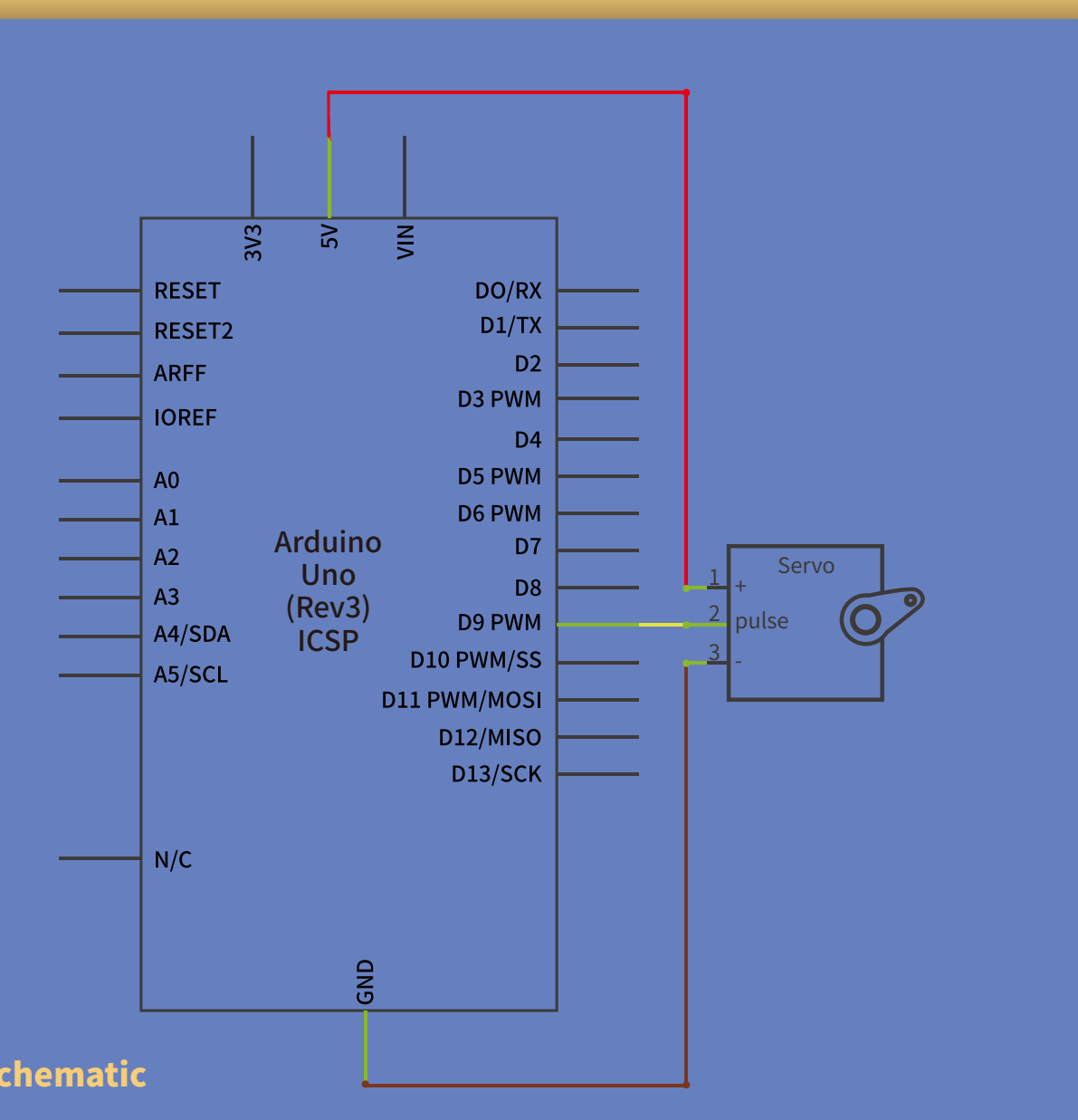
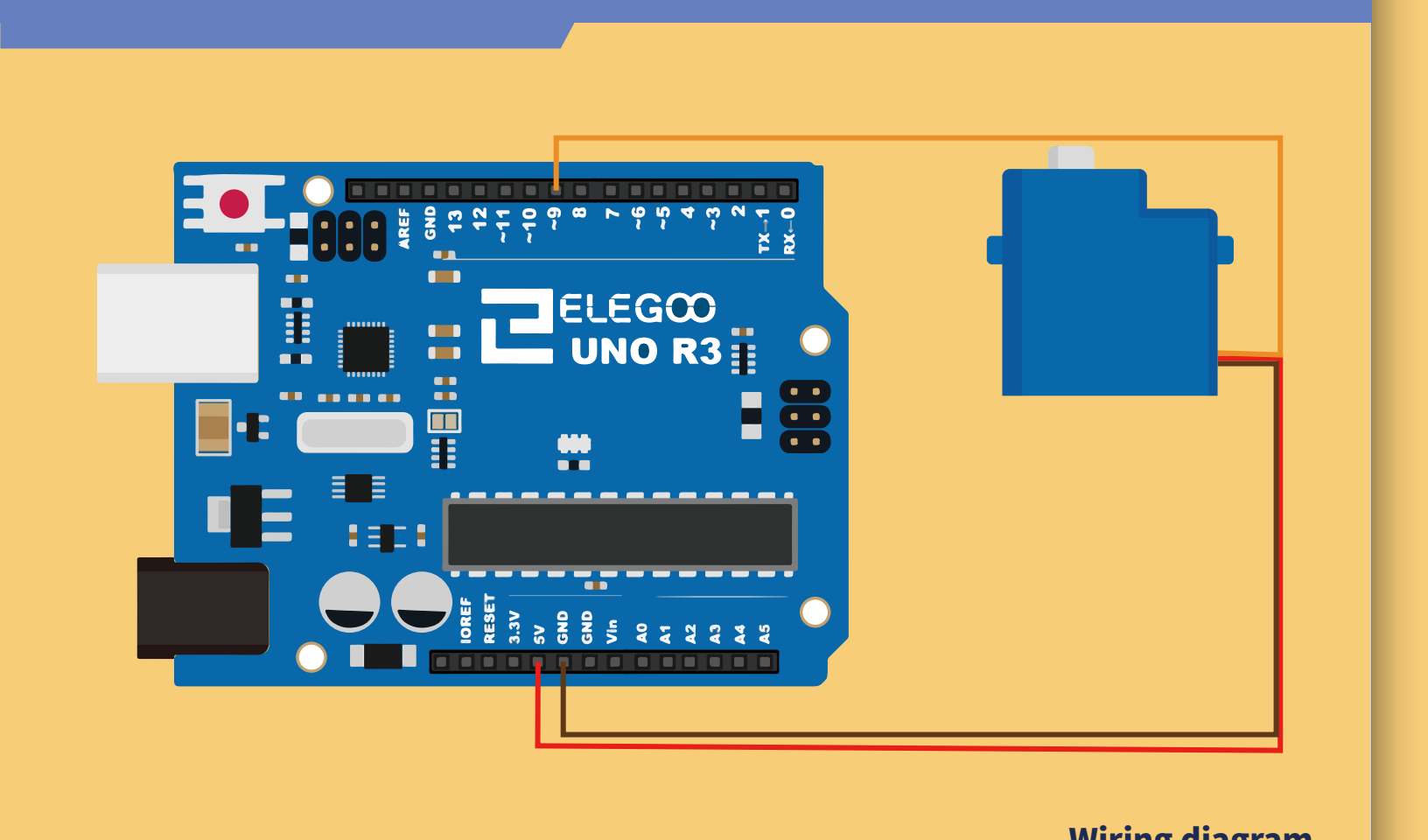
المحرك المؤازر (Servo) محرك ذو تروس يدور في هذا المثال حتى 180 درجة. ترسل UNO R3 نبضات تحدد الموضع المطلوب. السلك البني أرضي ويوصل بـ GND، والأحمر تغذية إلى 5V، والبرتقالي إشارة إلى المنفذ الرقمي 9.
المكونات المطلوبة
- لوحة أردوينو (ELEGOO UNO R3).
- المحرك المؤازر (Servo (SG90)).
- ثلاثة أسلاك ذكر إلى ذكر (Male to Male Jumper Wires).
مواصفات SG90
- موصل متوافق مع JR و FP؛ طول الكابل 25cm.
- سرعة بلا حمل: 0.12 ثانية لكل 60 درجة عند 4.8V، و 0.10 ثانية عند 6.0V.
- عزم التوقف عند 4.8V: 1.6kg·cm.
- درجة حرارة التشغيل: من -30 إلى 60°C؛ عرض النطاق الميت 5µs.
- جهد العمل: 3.5–6V.
- الأبعاد التقريبية: 23 × 12.2 × 29mm.
- الوزن: نحو 9g.

توصيل الدائرة
رفع البرنامج والمكتبة
قبل رفع البرنامج، تأكد من توفر مكتبة Servo في بيئة Arduino IDE. إذا لم تكن مثبتة أو ظهرت رسالة تشير إلى مكتبة مفقودة، فاتبع خطوات التثبيت في قسم «ما هي المكتبات؟» وطرق تثبيتها في الدرس 1.5 «وميض LED وإضافة المكتبات».
افتح ملف البرنامج servo.ino من ملفات الدرس في بيئة Arduino IDE. بعد إتمام التوصيلات، وصّل لوحة أردوينو (UNO R3 Board) بالحاسوب بكابل توصيل (USB Cable)، ثم اضغط زر Upload (رفع) لنقل البرنامج إلى اللوحة وتشغيله عليها.
الكود
servo/servo.ino
//www.elegoo.com
//2018.12.19
#include <Servo.h>
/* After including the corresponding libraries,
   we can use the "class" like "Servo" created by the developer for us.
   We can use the functions and variables created in the libraries by creating
   objects like the following "myservo" to refer to the members in ".".*/

Servo myservo;
//it created an object called myservo.
/*  you can see Servo as a complex date type(Including functions and various data types)
    and see myservo as variables.               */

void setup(){
  /*"attach" and "write" are both functions,
     and they are members contained in the complex structure of "Servo".
     We can only use them if we create the object "myservo" for the complex structure of "Servo".
  */
  myservo.attach(9);//connect pin 9 with the control line(the middle line of Servo)
  myservo.write(90);// move servos to center position -> 90°
}
void loop(){
  myservo.write(90);// move servos to center position -> 90°
  delay(1000);
  myservo.write(60);// move servos to center position -> 60°
  delay(1000);
  myservo.write(90);// move servos to center position -> 90°
  delay(1000);
  myservo.write(150);// move servos to center position -> 120°
  delay(1000);
}