مشروعات تطبيقية · الدرس 4.6
قياس المسافة وعرضها على LCD
العودة إلى الدروسفكرة المشروع والتوصيل
تقيس وحدة الموجات فوق الصوتية (Ultrasonic Module) المسافة إلى عائق أمامها وتعرضها على LCD1602. الاستمرار في ضغط الزر يبدأ القياس والعرض.
المكونات المطلوبة
- لوحة أردوينو (ELEGOO UNO R3) ولوحة الحساسات (ALL IN ONE Sensor Shield).
- شاشة العرض (LCD1602) ووحدة موجات فوق صوتية (Ultrasonic Module).
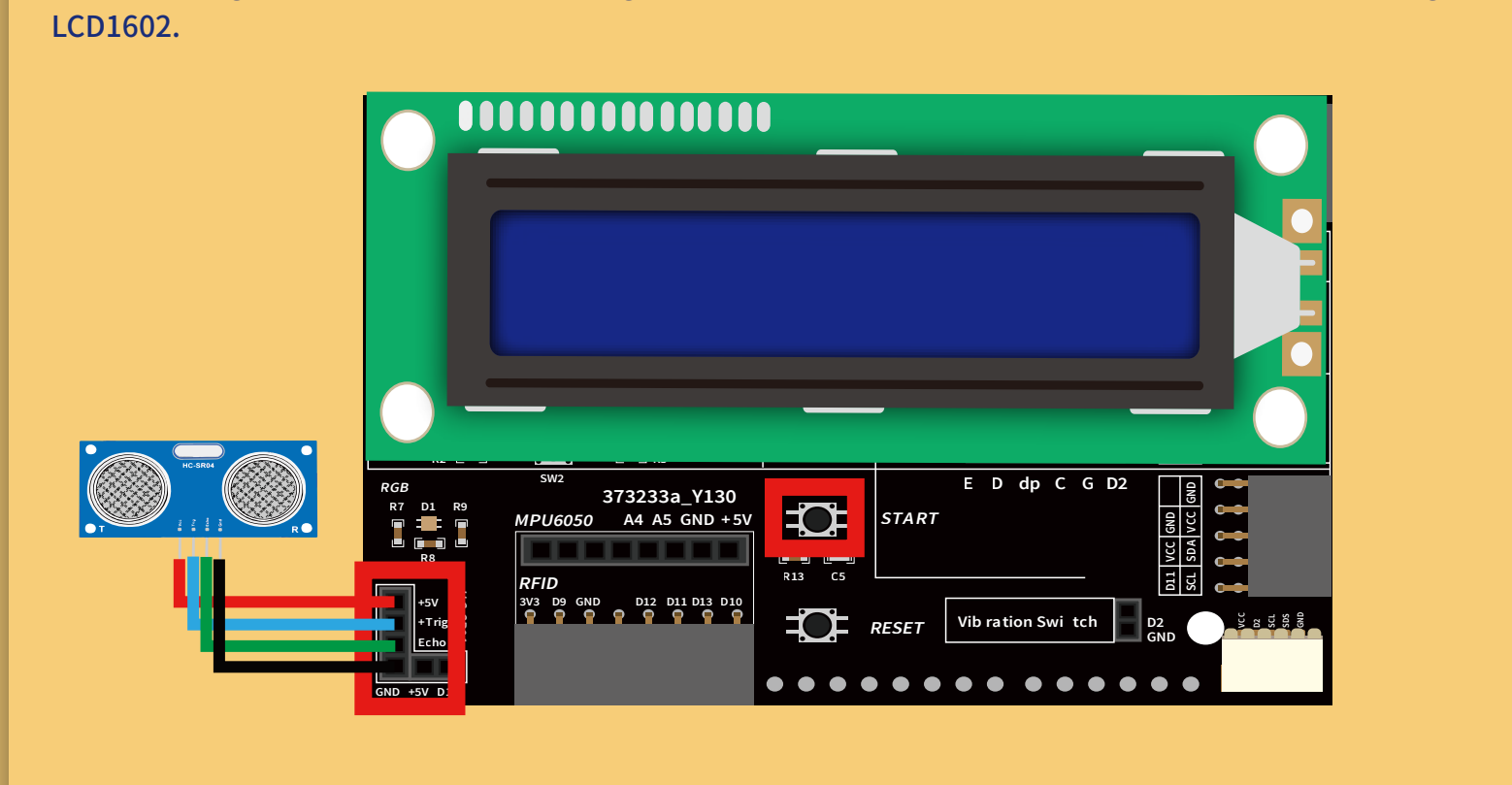
الجزء الأول: عرض LCD
بعد التهيئة تعمل الشاشة مثل درس LCD. قبل عرض محتوى جديد امسح المحتوى السابق بـ lcd.clear() في كل تحديث. يطبع المثال Ranging is، ويحصل على a من sr04.Distance()، ثم يضع المؤشر عند (0,1)، ويطبع a و cm، وينتظر 1000ms.
الجزء الثاني: قراءة الزر
يقرأ digitalRead(A0) إلى digitalVal. إذا كان LOW فالزر مضغوط، فيقيس المسافة ويعرضها. إذا كان HIGH يتوقف القياس، وينتظر 2000ms ثم يمسح LCD ويعرض Press the button.
افتح ملف البرنامج Ultrasonic_ranging.ino من ملفات الدرس في بيئة Arduino IDE. بعد إتمام التوصيلات، وصّل لوحة أردوينو (UNO R3 Board) بالحاسوب بكابل توصيل (USB Cable)، ثم اضغط زر Upload (رفع) لنقل البرنامج إلى اللوحة وتشغيله عليها.
الكود
Ultrasonic_ranging/Ultrasonic_ranging.ino
//www.elegoo.com
//2016.12.9

/*
  LiquidCrystal Library - Hello World

 Demonstrates the use of a 16x2 LCD display.  The LiquidCrystal
 library works with all LCD displays that are compatible with the
 Hitachi HD44780 driver. There are many of them out there, and you
 can usually tell them by the 16-pin interface.

 This sketch prints "Hello World!" to the LCD
 and shows the time.

  The circuit:
 * LCD RS pin to digital pin 7
 * LCD Enable pin to digital pin 8
 * LCD D4 pin to digital pin 9
 * LCD D5 pin to digital pin 10
 * LCD D6 pin to digital pin 11
 * LCD D7 pin to digital pin 12
 * LCD R/W pin to ground
 * LCD VSS pin to ground
 * LCD VCC pin to 5V
 * 10K resistor:
 * ends to +5V and ground
 * wiper to LCD VO pin (pin 3)

 Library originally added 18 Apr 2008
 by David A. Mellis
 Library modified 5 Jul 2009
 by Limor Fried (http://www.ladyada.net)
 Example added 9 Jul 2009
 by Tom Igoe
 Modified 22 Nov 2010
 by Tom Igoe

 This example code is in the public domain.

 http://www.arduino.cc/en/Tutorial/LiquidCrystal
 */

// include the library code:
#include <LiquidCrystal.h>
#include "SR04.h"
// initialize the library with the numbers of the interface pins
LiquidCrystal lcd(2,A3,8,7,A2,4);

#define TRIG_PIN 9
#define ECHO_PIN 3
SR04 sr04 = SR04(ECHO_PIN,TRIG_PIN);
long a;
int i=A0;
//the button
void setup() {
  // set up the LCD's number of columns and rows:
  lcd.begin(16, 2);
  //Serial.begin(9600);
  // Print a message to the LCD.
  pinMode(A0,INPUT);
  digitalWrite(A0, HIGH);
  lcd.print("Press the button");
}

void loop() {
  //Serial.print(sr04.Distance());
 int digitalVal = digitalRead(A0);
  //Press the button
  if(LOW==digitalVal)
 {
  //Clears the LCD screen
  lcd.clear();
  lcd.print("Ranging is ");
  a=sr04.Distance();
   // set the cursor to column 0, line 1
  lcd.setCursor(0, 1);
  lcd.print(a);
  lcd.print("cm");
  delay(1000);
 }

 if(HIGH==digitalVal)
 {
  delay(2000);
 lcd.clear();
 lcd.print("Press the button");
}
}